Bouncy Basketball Unblocked — Play Free Online
More Sports games










Bouncy Basketball unblocked: play Bouncy Basketball online free right here in your browser — no download, no sign-up, works on a school Chromebook.
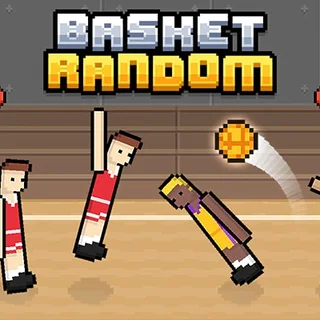
Bouncy Basketball is a fast-paced 2D sports arcade game that blends retro pixel graphics with chaotic, physics-based action. Instead of managing complex team strategies or multi-button combos, the entire experience revolves around timing, momentum, and springy jumps. Matches play out on a single court screen where players hop across the hardwood, jostle for rebounds, and launch high-arcing shots toward the rim.
The appeal lies in how unpredictable yet satisfying each possession feels. Because movement relies on bouncy physics rather than precise directional steering, every loose ball triggers a scramble. Whether you are contesting a buzzer-beater at the rim or snatching an opponent's pass out of mid-air, a quick round delivers instant arcade gratification.
Fans of the Learn to Fly series will immediately appreciate the emphasis on trajectory and physics. While Learn to Fly focuses on upgrading flight distance over repeated runs, Bouncy Basketball challenges your ability to read angles, manage launch momentum, and make split-second decisions under the hoop.
How to play
The game is designed with streamlined controls so you can jump straight into a match without a steep learning curve:
- Single-player movement: Use the Arrow keys to move and jump toward the ball.
- Shooting and stealing: Press the Spacebar or X key to jump for a block, contest a rebound, or release your jump shot.
- Two-player mode: In local two-player matches, Player 1 uses the Arrow keys with Space or X, while Player 2 controls their athlete using WASD keys.
- Timing your release: Holding the shoot button raises your player into the air, and releasing the button at the apex of the jump gives your shot maximum accuracy and range.
Tips for winning matches
Scoring consistently against tough opponents requires more than just button mashing. Keep these practical habits in mind during close games:
- Shoot at the peak of your jump: Releasing the ball while rising or falling drastically reduces shot consistency. Wait until your character reaches maximum elevation before letting go.
- Protect the paint: When the opponent is charging toward your hoop, position your defender directly between the ball-carrier and the net to force turnovers or trigger defensive blocks.
- Capitalize on fast breaks: If you secure a defensive rebound, jump forward immediately before the opposing defender recovers their balance. An uncontested leap often leads to an easy slam dunk.
Similar games on Learn to Fly 3
If you enjoy quick reflexes and physics-driven mechanics, several other titles on this site share a similar arcade energy. Blumgi Rocket offers high-flying aerial stunts and launch timing, while Flying Wheels Evolution focuses on momentum and vehicle physics. For players who enjoy calculated angle shots and projectile trajectory, Raft Wars provides engaging turn-based shooting battles.
Questions about Bouncy Basketball
Is Bouncy Basketball unblocked at school?
Bouncy Basketball runs in an ordinary browser tab from learntofly3.org, with nothing to download or install, so it plays on most school Chromebooks and work computers. If a network filter blocks the site, only that network's administrator can change it.
How do the controls work in Bouncy Basketball?
Use the Arrow keys to move and jump toward the hoop, then press Spacebar or X to shoot and block. In two-player mode, the second player uses WASD.
Can I play Bouncy Basketball with two players locally?
Yes. Bouncy Basketball includes a local two-player mode where two people can compete head-to-head on the same keyboard using Arrow keys and WASD.
Is Bouncy Basketball free to play in the browser?
Yes, Bouncy Basketball runs directly in your web browser with no download, account registration, or installation required.
Does Bouncy Basketball work on Chromebooks and laptops?
Yes, the HTML5 version runs smoothly inside any modern desktop or laptop browser, including Chromebooks, using standard keyboard controls.